SoonPlayer search, arriving with Riot's approval

Flaro: Clarity before and after every game.

A League of Legends companion for Windows: a plan in champion select, your own numbers in a quiet window while you play, and an honest review when the game ends.

Flaro reads only Riot's own local interfaces on your PC. It never touches the game, and it writes nothing but the rune page you click to import.

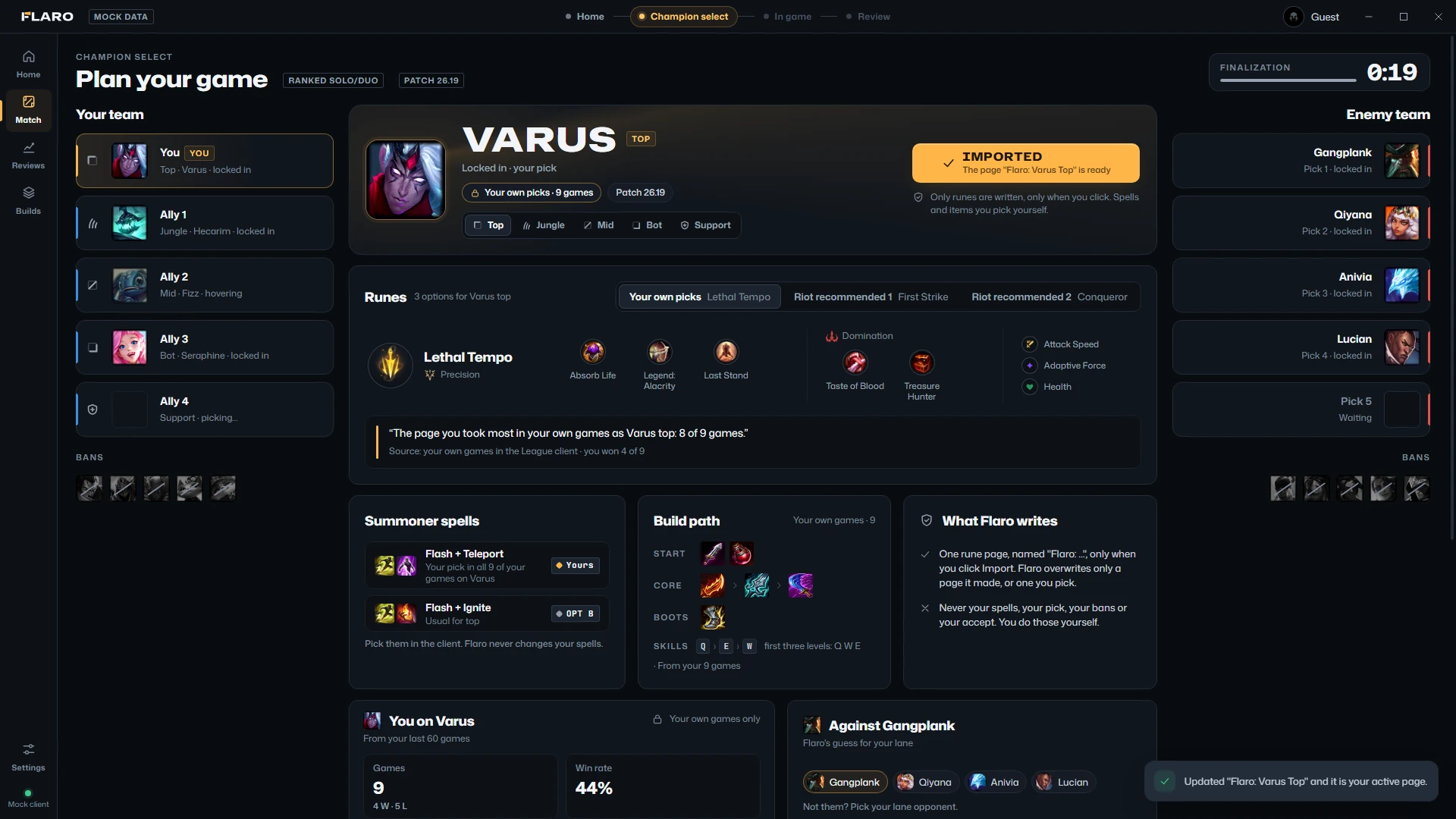
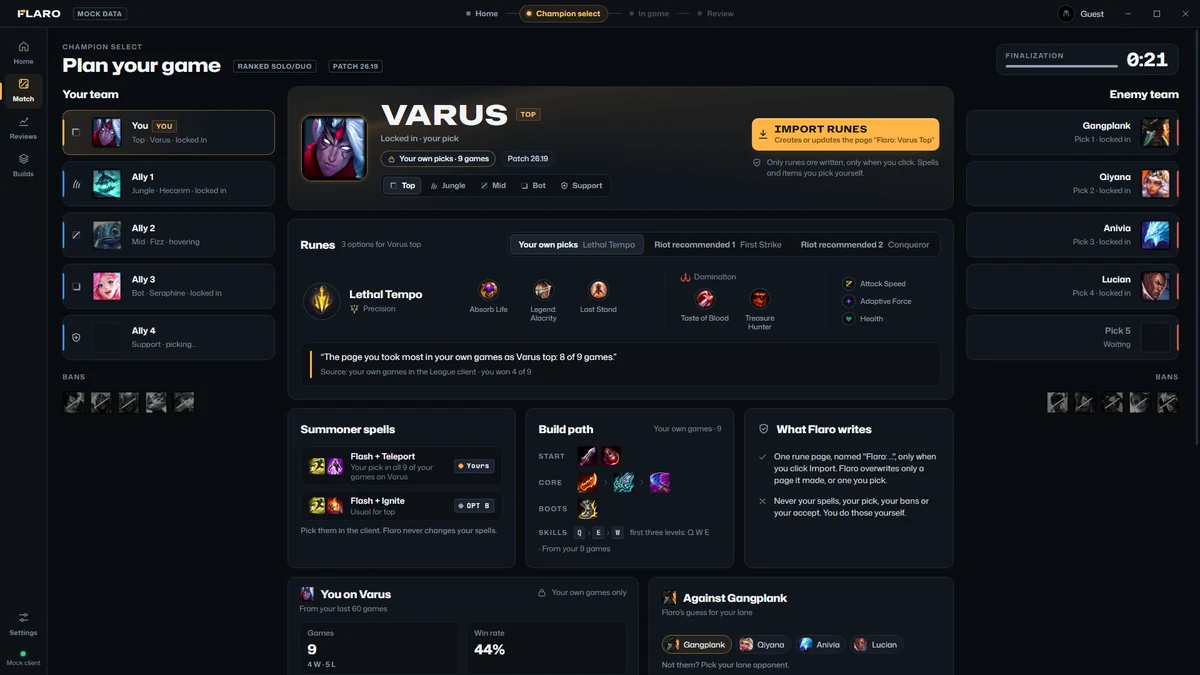
Flaro in champion select: your team as Ally 1 to 4, three rune options for Varus top, spells, a build path with your usual skill order, and the Import runes button.
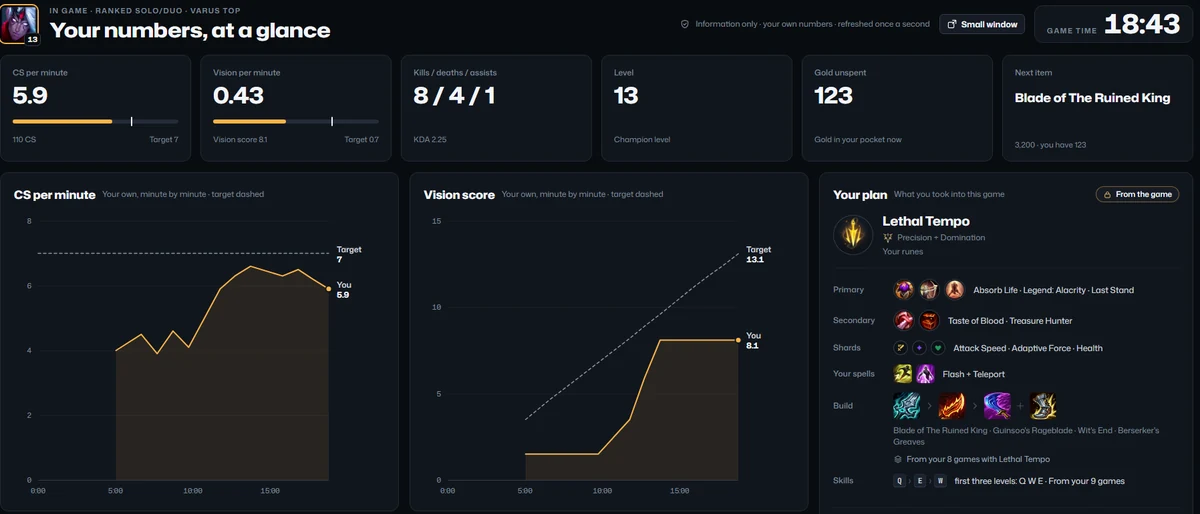
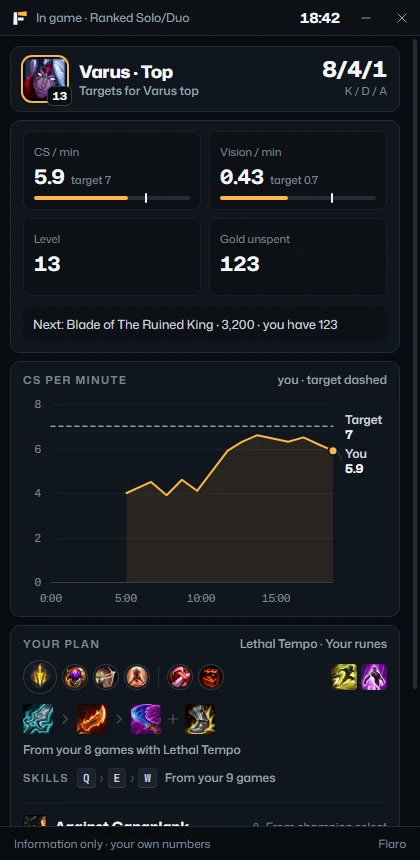
The small in-game window: CS and vision per minute against targets, the next item of your plan, a CS chart, and the plan from champion select.
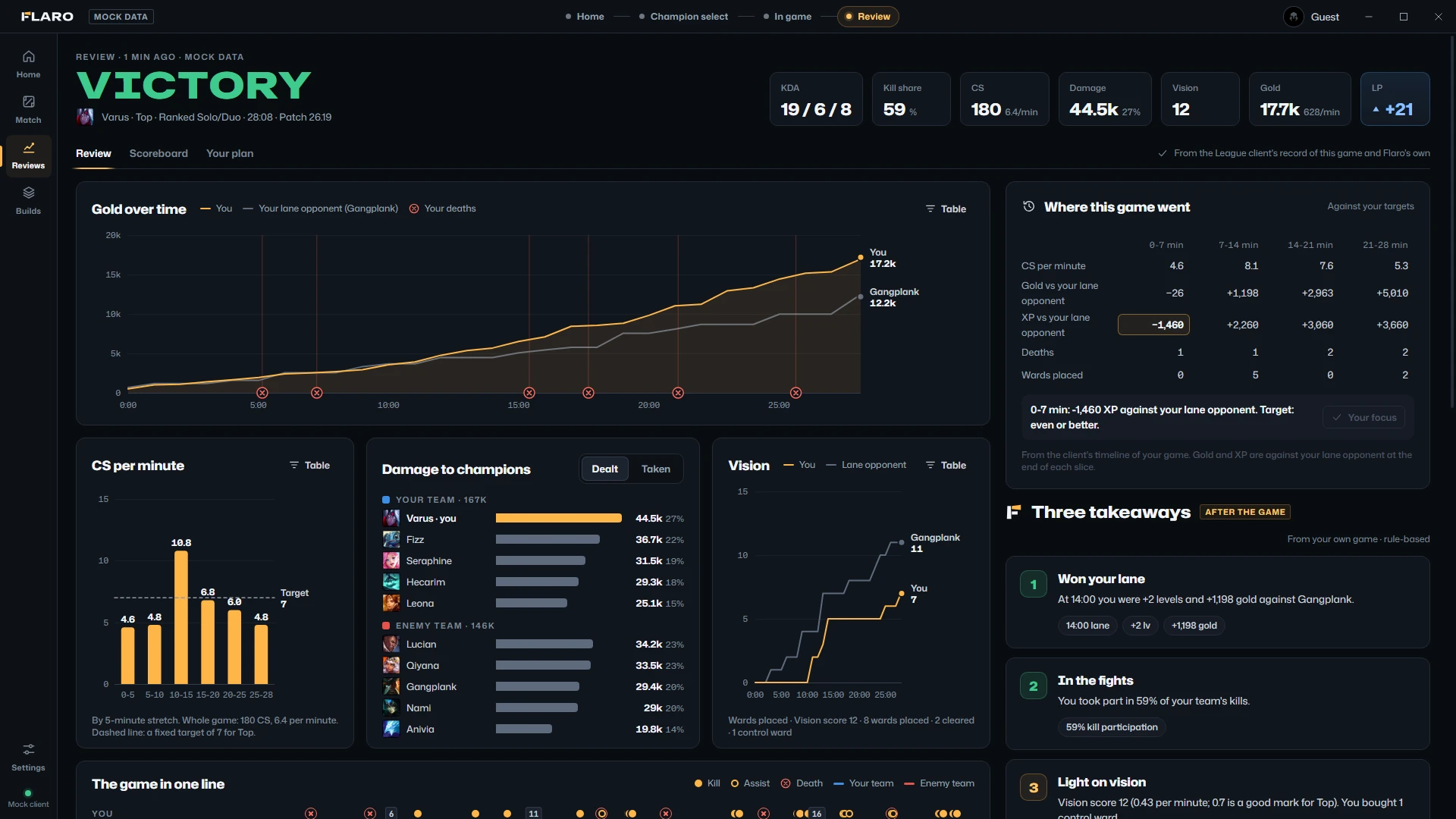
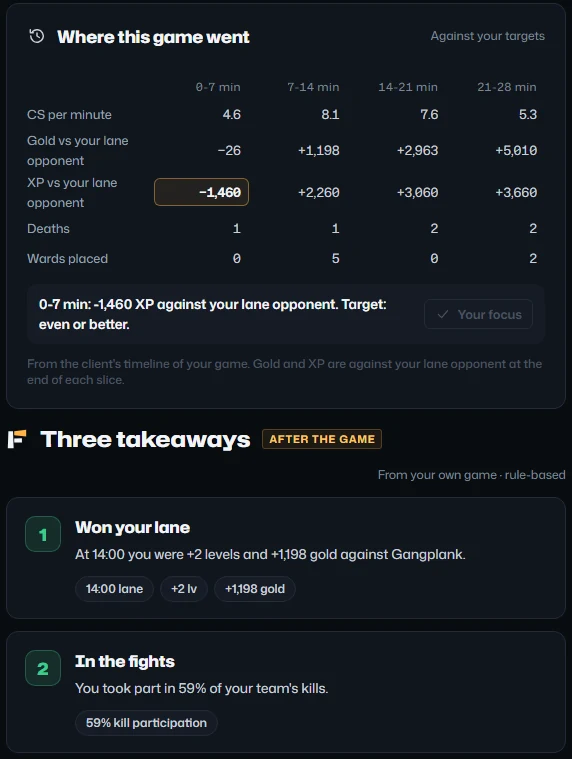
The review's right column: where this game went, slice by slice against your targets, and the first two of three takeaways: won your lane, and in the fights.
Flaro on its built-in mock League client, playing a sample game; that is why the screens say “Mock data”. Champion select, the small in-game window, and the review.
0.7%of one CPU core in a game
120MBof memory in a game
1/ supdate a second while you play
0ads, trackers or cookies
EN·ROEnglish and Română

See it work

One click. One rune page.

Champion select in Flaro: pick one of the options, click Import runes, and the page is in your League client. Twelve silent seconds; they play while they are on screen.

Recorded on Flaro's built-in mock client with made-up players. The whole tour, from the first launch to the review and Settings, is 2 minutes: watch it (7 MB).

How it works

Flaro follows the match.

It switches screens by itself as your game moves on: Home before you queue, your plan in champion select, your own numbers in game, and a review when it ends.

01Before the game

Know where you stand, and what to work on.

Home shows your rank, your last 20 games against a target for your role, and the one thing your last review asked you to change.

  • LP per game: the LP each ranked game won or lost, as the League client reports it.
  • Win rate, KDA, and CS and vision per minute, each against a target.
  • Your focus from the last review. Shown here and in champion select, never during the game.
  • Short tips for your role and your champions, written by hand.
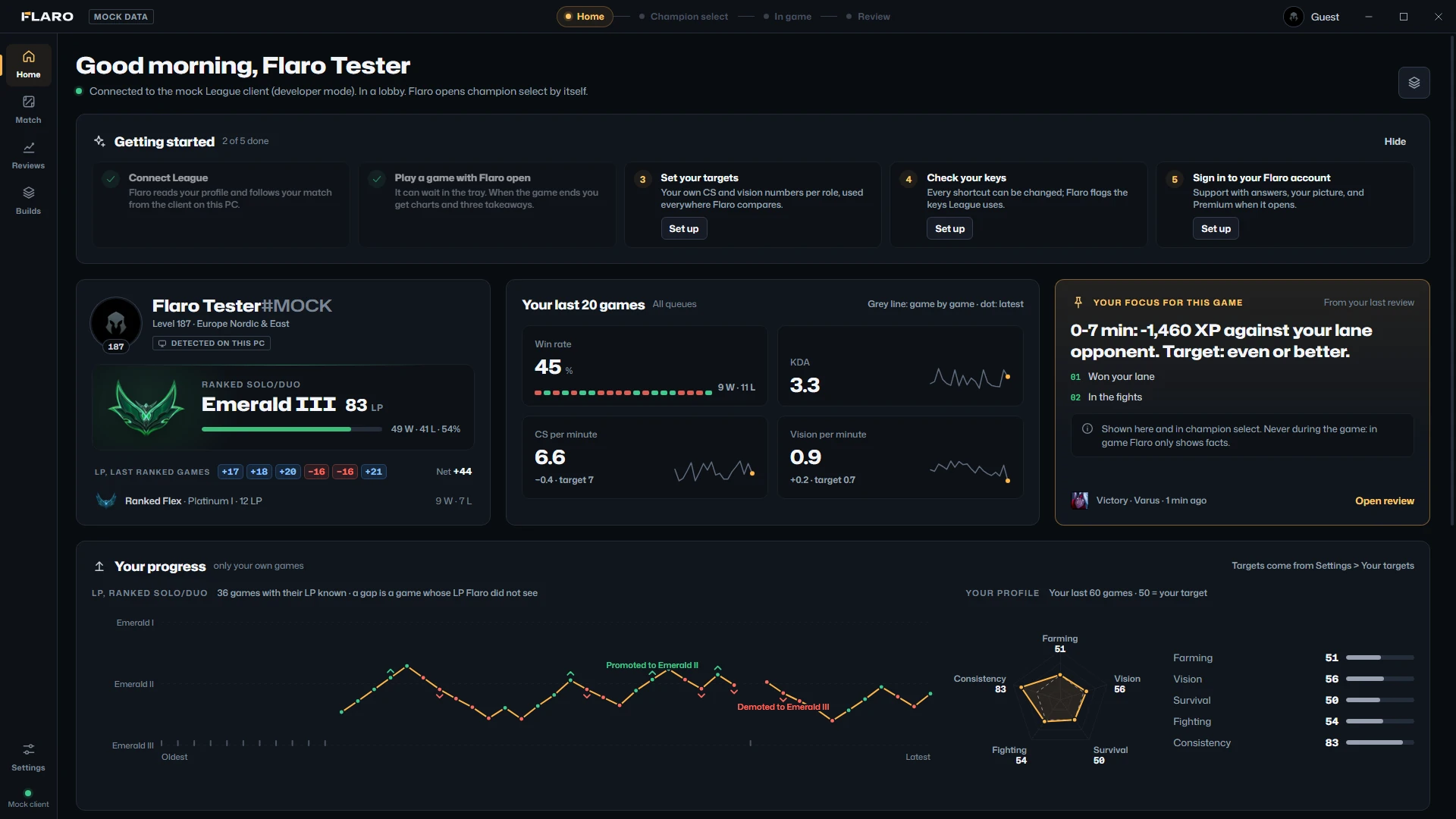
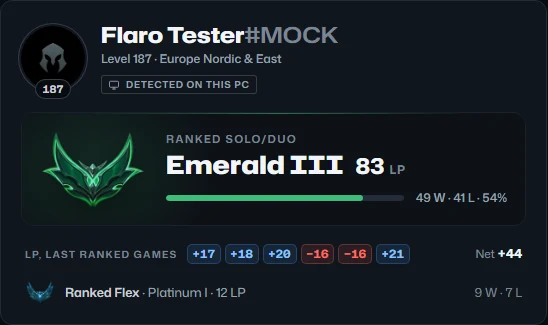
Flaro's Home screen: getting started, profile and rank with the LP of your last ranked games, your last 20 games, your focus for this game, and your progress.
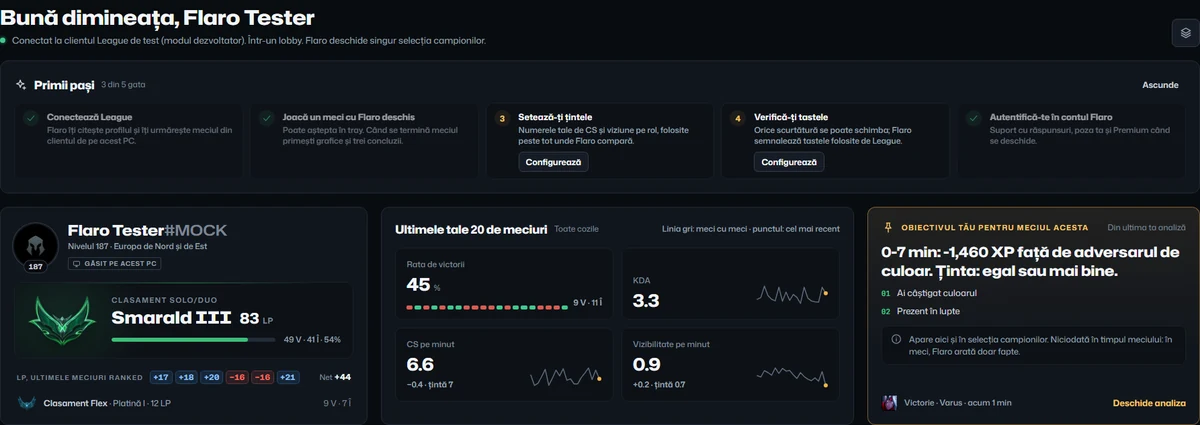
The rank card on Home: Emerald III, 83 LP, and the LP of the last ranked games: +17, +18, +20, −16, −16 and +21.

02Champion select

Choose a plan. Import it in one click.

Flaro opens champion select by itself. For your champion and role it lays out up to three rune pages, two pairs of summoner spells and a build path: options, each with its source.

  • Your own picks from your own games, Riot's recommended pages from your client, or a starter page. Each option says where it comes from.
  • One click writes one rune page, named “Flaro: Varus Top”. If your pages are full, Flaro asks which one to replace.
  • Players outside your party stay anonymous as Ally 1–4. Flaro never looks anyone up.

You pick, ban, accept and lock in yourself. Rune import is off in the KR region.

Champion select just after an import: the button reads Imported, and a message confirms the page Flaro: Varus Top is active in the client.

03In game

Your own numbers. Nothing else.

A normal window for a second screen or an alt-tab: CS and vision per minute against a fixed target, KDA, level and gold, once a second, next to the plan you chose.

  • Targets are fixed rules of thumb for your role, not live statistics and not advice.
  • Your plan: the runes and spells you took, and a build for them. It never changes mid-game.
  • No timers, no alerts, no advice, and nothing about other players.

The small window, 420 × 860, sits on a second screen and opens without taking the focus from the game.

Flaro's in-game window: CS and vision per minute against their targets, kills, deaths and assists, level, gold, the next item of your plan, CS and vision charts, and your plan.
The small in-game window for a second screen.

04After the game

An honest review, every game.

When the game ends, the review opens by itself: what happened, in charts, and three takeaways with the numbers behind them.

  • Gold over time against your lane opponent, with your deaths marked. Then CS per minute, damage and vision.
  • Three takeaways: what went well, what cost you, and the evidence for each.
  • One focus for your next game, waiting on Home before you queue.
Flaro's post-game review: victory, seven summary numbers, gold over time, where this game went, CS per minute, damage to champions, vision and three takeaways.
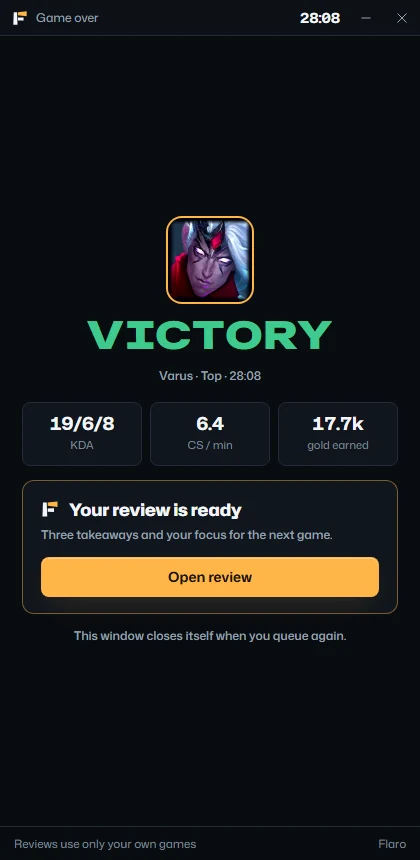
The small window when the game ends: Victory, three numbers, and your review is ready.

New in 0.2 and 0.3

Count your LP. See your progress.

Your progress on Home, the LP of every ranked game, a rebuilt Settings screen, the whole app in Romanian, and a keyboard shortcut for everything. Player search is arriving with Riot's approval.

0.3.2

Your progress, at a glance.

An LP graph of your ranked games from the standings your League client reported, with a gap where one isn't known, and a five-axis profile of your own games against your targets. Nothing is guessed.

Player search is arriving with Riot's approval, through our own server: you won't need a key of your own.

Your progress on Home: an LP graph of your ranked games with a promotion and a demotion marked, and a five-axis profile against your targets.
0.2.1

LP per game.

Every ranked game on Home shows the LP it won or lost, as the League client reports it. Never an estimate: a dash when it isn't known.

The LP of your last ranked games on Home: +17, +18, +20, −16, −16 and +21, and the net change.
0.2.0

Settings, rebuilt.

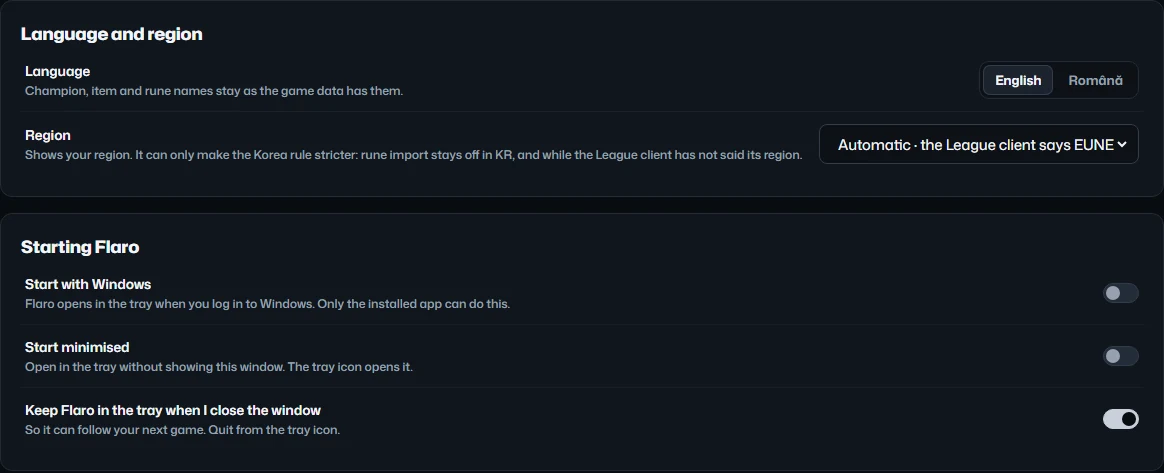
Language and region, start with Windows, stay in the tray, the graphics card off unless you want it, and your reviews exported as JSON or CSV.

Settings, General: language and region, and how Flaro starts with Windows and stays in the tray.
0.2.0

English and Română.

The whole app in either language. Champion, item and rune names stay as the game has them.

Home in Romanian: Bună dimineața, Flaro Tester, the first steps, the rank, and your last 20 games.
0.2.0

Every screen by keyboard.

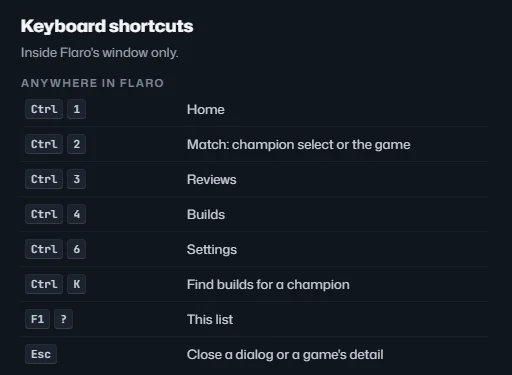
Ctrl and a number for each screen, Ctrl I to import your runes, and the arrow keys in every list.

Flaro's keyboard shortcuts.

The review

Three takeaways. Numbers first.

Each takeaway points at the moment it comes from and ends with one thing to try next time. They come from rules applied to your own game's record, never from guesses about other players.

From the sample game in the app: Varus top, a 28-minute win. The takeaways are rule-based, not written by AI.

1

Won your lane

At 14:00 you were 2 levels and 1,198 gold ahead of your lane opponent.

14:00 lane+2 levels+1,198 gold
2

In the fights

You took part in 59% of your team's kills.

59% kill participation
3

Light on vision

Vision score 12, or 0.43 a minute, where 0.7 is a good mark for top. You bought one control ward.

vision 120.43 / min8 wards placed

Next game: buy a control ward on every recall.

Focus for your next game

Buy a control ward on every recall.

Shown on Home and in champion select before your next game. Never during it.

Trust

What Flaro never does.

You should never have to wonder what a companion app is doing on your PC. This is all of it: what Flaro reads, the one thing it writes, and the lines it doesn't cross.

Everything happens on your PC

What it never does

  • Touch the game. No memory reading, no injected code, no hooks, no files in Riot's folders.
  • Act for you. No auto-accept, pick, ban or lock-in, and no simulated input.
  • Coach you mid-game. No timers, alerts or advice while you play.
  • Unmask anyone. Ranked champion select stays anonymous, and Streamer Mode is respected.
  • Guess your MMR. No MMR, no LP predictions, no name history.
  • Ask for your Riot password. Not once, not anywhere.
  • Show ads, or sell or share anything about you.
  • Look for League on its own. The connection stays off until you switch it on.

Honest status. Flaro hasn't been registered with Riot Games yet; its application is being prepared. Until Flaro is registered, the app asks you to connect it to a PBE account, not your main one.

Measured, not promised. CPU and memory in six situations are on the features page; Riot's rules and Vanguard are in the FAQ.

Pricing

Free during the beta.

Everything on this page is free while Flaro is in beta. A Premium plan may come later, with deeper reviews and a longer history. It won't take anything away from the free version, and no payment is taken today.

See pricing

Questions

Before you install.

The short answers. The rest are on the FAQ page.

All questions
Can Flaro get my account banned?

Nobody outside Riot can honestly promise you anything about your account, so we won't. What we can do is tell you exactly what Flaro does.

It reads Riot's own local interfaces on your PC and never touches the game: no memory reading, no injected code, no automation. It writes one thing, the rune page you click to import. That is the whole list, and the trust section spells it out.

Flaro hasn't been registered with Riot Games yet; its application is being prepared. Until Flaro is registered, the app asks you to connect it to a PBE account, not your main one.

Is Flaro endorsed or approved by Riot?

No. Flaro isn't endorsed by Riot Games. Flaro hasn't been registered with Riot Games yet; its application is being prepared. Even once it is registered we won't call Flaro “approved”: Riot's registration of an app isn't an endorsement of it.

Does Flaro show anything during the game?

Only your own numbers, in a normal window you put on a second screen or alt-tab to: CS and vision per minute against a fixed target for your role, KDA, level and gold, plus your plan: the runes and spells you took and a build for them.

There are no timers, no alerts and no advice, and nothing is drawn over the game. The analysis waits until the game is over.

Will Flaro slow my game down?

It is built not to. Measured on the developer's PC during a game, Flaro used about 0.7% of one CPU core and 120 MB of memory, with its window updating once a second. It leaves your graphics card to the game unless you turn that on in Settings, and nothing in it animates on a loop.

Can I download Flaro now?

Flaro is in a private beta while Riot reviews it: the installer goes to invited testers only. Write to [email protected] to ask for an invite, and we'll tell you when downloads open for everyone.

What does it cost?

Nothing during the beta, and no payment is taken today. A Premium plan may come later, but only once Riot has registered Flaro and agreed to it, and there will always be a free version. See pricing.

Your next game, with a plan.

Flaro 0.3.11 for Windows 10 and 11. Free during the beta.